If your company runs a PHP website, whether it is WordPress, Joomla or an in-house application, one of the quietest and most damaging things that can happen to it is a PHP web shell. It is a small script, sometimes a single line, that turns your web server into a remote control for whoever planted it. This article covers how web shells get onto a server, how to spot one, which Cloudflare features stop them, and the gaps Cloudflare cannot close for you.
What a PHP web shell actually is
A web shell is a script an attacker places on your web server so they can run commands through ordinary HTTP requests. PHP makes this easy: functions such as system, exec, shell_exec and eval hand a request parameter straight to the operating system. Whatever the attacker sends runs with the same permissions as your web server process.
Web shells are hard to notice because they look like normal web traffic. They answer on ports 80 and 443 like every other page, so a network firewall sees nothing unusual. Attackers also disguise them: base64-encoded payloads, file names that mimic core files, or a few lines appended to a legitimate PHP file. Many owners only find out when browsers start showing a "deceptive site" warning or the hosting provider suspends the account for sending spam.
How attackers get one onto your server
- Upload forms that trust the file name. A profile picture or document upload that only checks the extension can be fooled into accepting a
.phpor.phtmlfile dressed up as an image. - Outdated plugins and themes. Vulnerable WordPress plugins remain one of the most common entry points, largely because many sites install them once and never update them again.
- Vulnerabilities in PHP itself. CVE-2024-4577, a flaw in PHP-CGI on Windows that also affected default XAMPP installs, was exploited within days of the June 2024 patch to run code on servers and drop ransomware.
- Stolen credentials. An attacker who logs in to your CMS admin panel, FTP account or hosting control panel can simply upload the file like any other user.
Signs you may already have one
- PHP files sitting in folders meant for images or documents, such as
wp-content/uploads. - Core PHP files with recent modification dates that nobody on your team can explain.
- Obfuscated code such as
eval(base64_decode(or long unreadable strings. - POST requests in the access log to files that no page links to.
- Unexplained CPU spikes, a surge of outgoing email, or redirects that only trigger for visitors arriving from search engines.
Where Cloudflare helps
With your site proxied through Cloudflare, every request passes Cloudflare's edge before it reaches your server. That gives you two chances to stop a web shell: when the attacker tries to plant it, and when they try to use it.
1. WAF Managed Rules
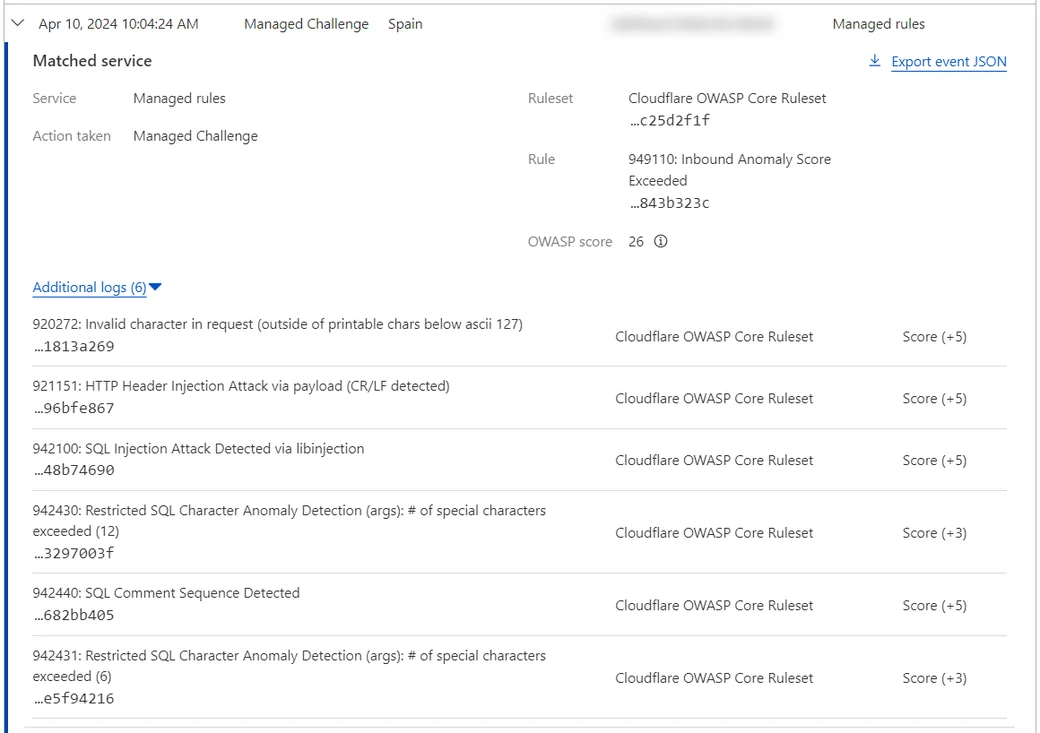
Every Cloudflare plan, including Free, includes the Free Managed Ruleset, which Cloudflare maintains and updates for widely exploited vulnerabilities. Pro and higher plans add the Cloudflare Managed Ruleset and the OWASP Core Ruleset, which catch broader attack patterns such as command injection, remote code execution and PHP code smuggled into request parameters. Start the stricter rulesets in Log mode, review what they would have blocked for a week or two, then switch to Block once you are confident they will not break legitimate traffic.
2. A custom rule that blocks PHP in upload folders
For the effort involved, this is the most effective rule you can add. Upload folders should never contain PHP that needs to execute, so you can block any request for a PHP file inside them:
lower(http.request.uri.path) contains "/wp-content/uploads/" and lower(http.request.uri.path) contains ".php" with the action set to Block.
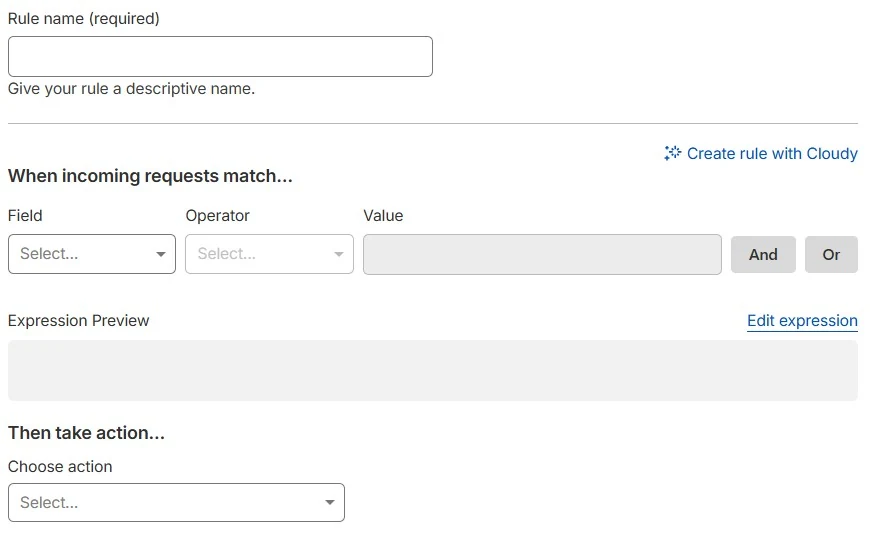
Even if an attacker manages to upload a shell, they cannot reach it through your domain. Apply the same idea to paths that should never be public, such as /wp-admin, /xmlrpc.php or phpMyAdmin: allow only your office IP addresses, or put a Managed Challenge in front of them. The Free plan allows 5 custom rules, Pro 20 and Business 100.
3. Rate limiting and bot controls
Password guessing on login pages and scanning for vulnerable files are jobs for bots that send large volumes of requests. A rate limiting rule on your login and upload endpoints, combined with Bot Fight Mode, makes both far slower and noisier for the attacker.
4. Put admin pages behind Cloudflare Access
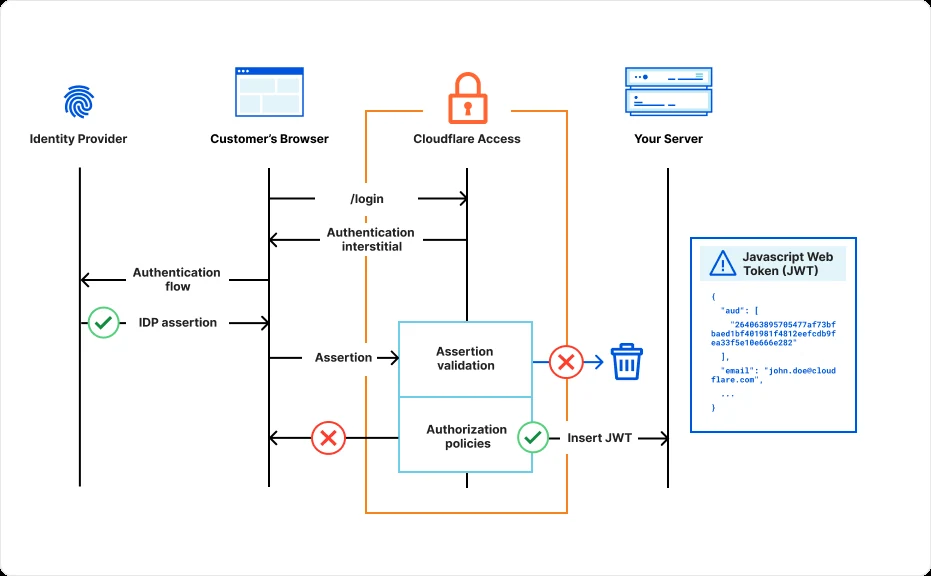
Cloudflare Access, part of Cloudflare Zero Trust, makes users prove who they are before a request ever reaches your server, for example with a one-time code sent to a company email address. Put it in front of your CMS admin area or phpMyAdmin and an unpatched admin page is no longer reachable from the internet.
5. Close the direct path to your origin
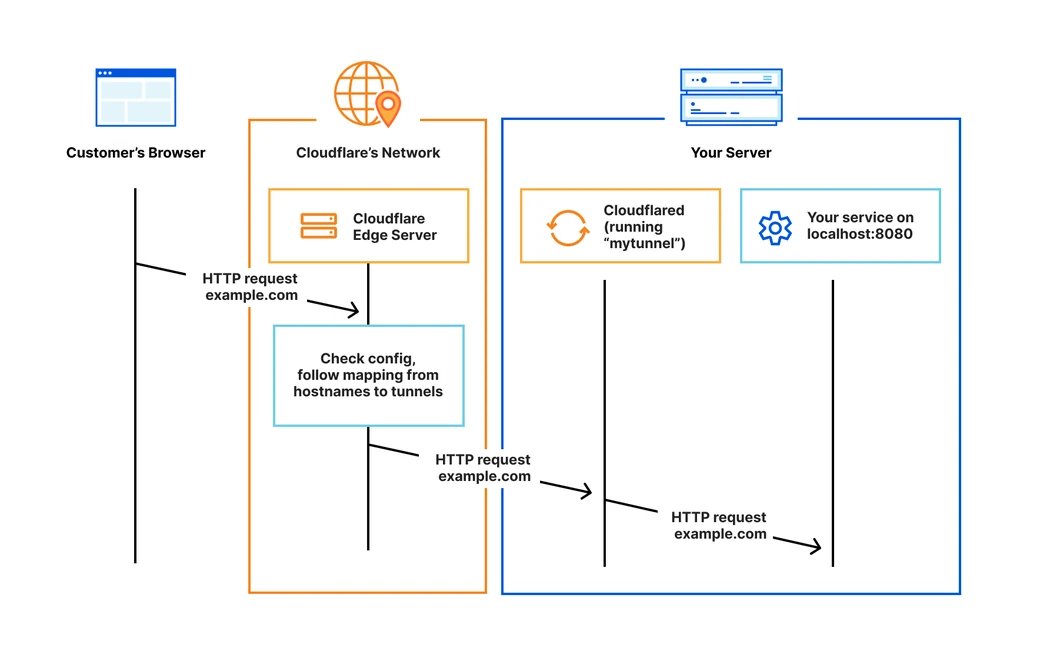
Cloudflare can only filter traffic that goes through Cloudflare. If your server's real IP address is known, an attacker can send requests straight to it and skip every rule above. Restrict ports 80 and 443 on the server firewall to Cloudflare's published IP ranges, or use Cloudflare Tunnel, where a small agent on your server opens an outbound connection to Cloudflare so no inbound ports need to be open at all. Authenticated Origin Pulls adds a further check that each request genuinely came from Cloudflare.
6. Scanning uploaded files (Enterprise)
Malicious uploads detection scans files in upload requests for malware. It is an Enterprise add-on, and it detects rather than blocks: you still need a custom rule that acts on its result.
What Cloudflare cannot do for you
- It cannot see inside your server. A web shell already planted in a path your rules do not cover keeps working, and Cloudflare does not scan the files on your disk.
- It does not patch anything. Managed rules buy you time, but the vulnerable plugin or PHP version is still there until you update it.
- It does not cover other ways in. Anyone holding your FTP, SSH or hosting panel credentials can place files without touching Cloudflare.
Hardening the server alongside Cloudflare
- Disable PHP execution in upload directories at the web server level (Apache or Nginx) as well, rather than relying on Cloudflare alone.
- Run a PHP version that still receives security fixes, keep your CMS, plugins and themes updated, and remove plugins you no longer use.
- If your application does not need them, disable
exec,shell_exec,system,passthru,proc_openandpopenwithdisable_functionsin php.ini. - Apply least privilege to file permissions: the web server process should not be able to overwrite your application code.
- Use file integrity monitoring so you are alerted the moment a PHP file is added or changed.
- Keep 3-2-1 backups with at least one immutable copy, so you always have a known-clean version to restore.
If you find a web shell
Deleting the file is not the end of it. Attackers usually leave more than one, and the hole they came through is still open. Take the site offline or behind a maintenance page, preserve logs and copies of the suspicious files, work out how the attacker got in, and look for other planted files and unfamiliar user accounts. Then rotate every related password and key, restore from a backup you know is clean, and patch the entry point before bringing the site back online.
The bottom line
Cloudflare is a strong and inexpensive first line of defense. Managed rules, a custom rule that blocks PHP in upload folders and Access in front of your admin pages can all be set up in an afternoon. They work best together with a locked-down origin, prompt updates and sensible server settings, which together cover both how a web shell gets in and how it gets used.